


Last Updated: June 2026
Surfer SEO review 2026 — the quick answer: Surfer SEO is the most data-rich content optimization tool on the market for agencies and in-house SEO teams. Its Content Editor gives real-time scoring against 500+ on-page factors, and the SERP Analyzer goes deeper than any rival. At $99/mo (or $79/mo annually), it’s premium but earns back its cost fast for teams publishing at scale.
Surfer SEO Review: Quick Comparison vs Top Alternatives (2026)
| Tool | Starting Price | Best For | Standout Feature | Rating |
|---|---|---|---|---|
| Surfer SEO | $79/mo (annual) | Agencies & teams | 500-factor SERP Analyzer | ⭐⭐⭐⭐⭐ 4.8/5 |
| NeuronWriter | $19/mo | Solo bloggers | 170+ languages, lifetime deal | ⭐⭐⭐⭐ 4.3/5 |
| Frase | $45/mo | Content briefs | Fast brief generation | ⭐⭐⭐⭐ 4.2/5 |
| SEMrush Writing Assistant | Bundled with SEMrush | SEMrush users | Tone + readability checks | ⭐⭐⭐⭐ 4.0/5 |
| Clearscope | $189/mo | Enterprise content | Grade-based scoring | ⭐⭐⭐⭐ 4.1/5 |
What Is Surfer SEO?
Surfer SEO is a cloud-based content intelligence platform founded in 2017 that helps writers and SEO teams optimize pages for Google rankings. Unlike traditional SEO tools that focus on backlinks or technical audits, Surfer sits squarely in the content optimization layer — it analyzes what the top-ranking pages for a given keyword have in common and tells you exactly how to match or beat them.
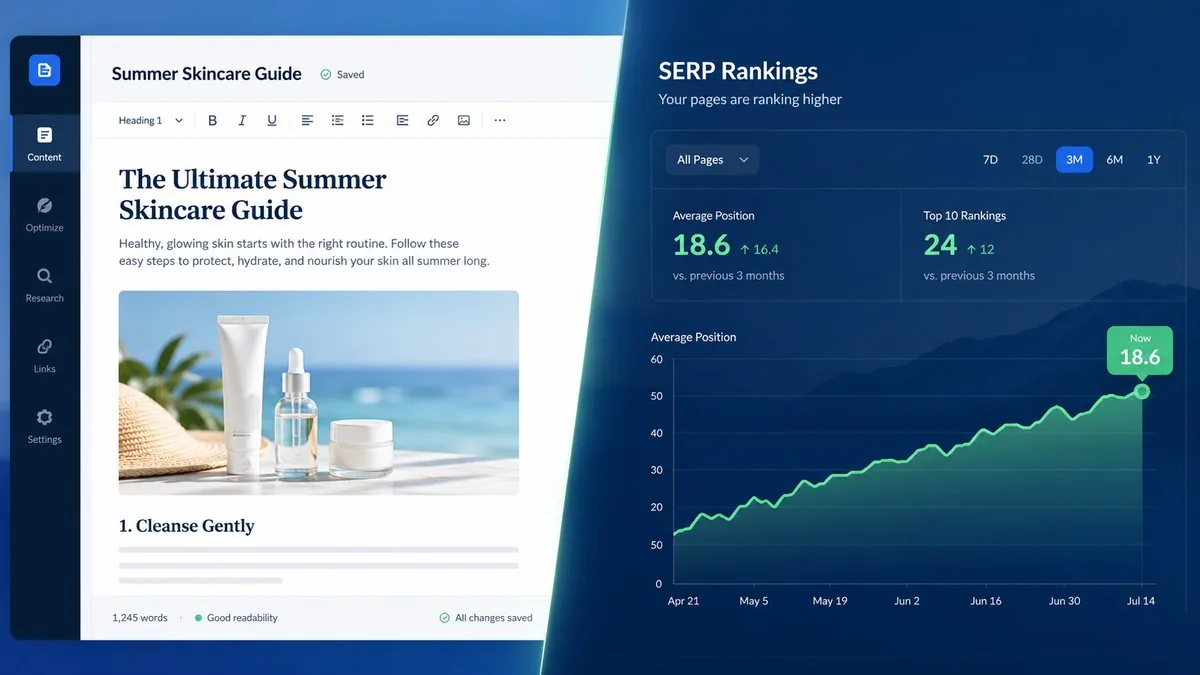
Surfer’s flagship product is its Content Editor, a Google Docs-style interface that scores your content in real time as you write. It’s used by over 150,000 content teams worldwide, from freelance bloggers to enterprise marketing departments. The platform added meaningful AI features in early 2026, including AI-readability analysis and AI-search-guidelines inside the editor, keeping it relevant as search shifts toward AI Overviews.
Key Features
Content Editor
The Content Editor is why most people buy Surfer. You enter a keyword, pick your target country, and Surfer generates a live brief showing the ideal word count, heading count, keyword density, NLP terms to include, and a real-time content score from 0 to 100. As you write — or paste content in — the score updates instantly.
What separates it from rivals is the granularity. Surfer doesn’t just say “add the word ‘cloud storage’ twice.” It tells you which NLP entities to include (e.g., “Amazon S3,” “backup,” “encryption”) based on what Google’s top-ranked pages actually contain. The 2026 AI Auto-Optimize feature can now automatically insert missing entities and restructure thin paragraphs — useful for rapid content refreshes on older posts.
On the Essential plan you get 30 Content Editor documents per month, which is enough for a small agency or a prolific blogger. The Scale plan removes the cap for growing teams.
SERP Analyzer
The SERP Analyzer is Surfer’s most powerful — and most underused — feature. Enter any keyword and Surfer pulls the top 50 results and compares 500+ on-page signals across all of them: average word count, keyword frequency, partial-match usage, heading structure, alt text, image count, page speed, and even the presence of hidden/accordion content.
Where this matters most: competitive niches. If you’re trying to rank for “best project management software,” you need to know that the top-ranking pages average 3,800 words, use the H2 “Pricing” on 80% of pages, and all have a comparison table in the first scroll. SERP Analyzer shows you this in minutes. Note: SERP Analyzer is a $29/mo add-on on the Essential plan but included free on Scale and above.
Keyword Research
Surfer’s built-in keyword research is solid but not a replacement for dedicated tools like Ahrefs or SEMrush. It surfaces keyword clusters around a seed term, shows search volume, keyword difficulty, and SERP similarity scores. The Topical Map feature is particularly useful — it groups related keywords into clusters so you can plan a whole content hub, not just single posts. For agencies building out authority sites (like WithO2.com), Topical Maps cut planning time significantly.
AI Features (2026)
As of February 2026, Surfer added two headline AI features. AI Search Guidelines flags whether your content meets the quality signals Google’s AI Overviews favour — things like factual density, entity coverage, and E-E-A-T signals. AI Readability Analysis checks whether an AI assistant would accurately summarize or cite your page. These aren’t gimmicks; as AI Overviews eat more zero-click queries, appearing inside them has real traffic value.
Surfer AI articles (auto-generated drafts optimized to your brief) are available as an add-on at $29 per article beyond your plan’s allocation.
Surfer SEO Pricing (June 2026)
| Plan | Monthly | Annual (per month) | Content Editor docs | SERP Analyzer |
|---|---|---|---|---|
| Essential | $99/mo | $79/mo | 30/mo | $29/mo add-on |
| Scale | $219/mo | $175/mo | Unlimited | Included |
| Enterprise | $999/mo+ | Custom | Custom | Included + API |
AI Tracker (monitors brand visibility in AI search) is $95/mo extra across all plans. Surfer offers a 7-day money-back guarantee — no questions asked — which makes it low-risk to test. Annual billing saves roughly 20% vs monthly. Prices verified June 2026 on Surfer’s official pricing page.
Surfer SEO vs NeuronWriter: Which Is Right for You?
These two tools dominate the content optimization space below the Clearscope price tier. Here’s the honest breakdown:
| Feature | Surfer SEO | NeuronWriter |
|---|---|---|
| Starting price | $79/mo (annual) | $19/mo |
| Content Editor | ✅ Real-time, 500-factor | ✅ NLP-based, Google NLP API |
| SERP Analyzer depth | ⭐⭐⭐⭐⭐ 500+ factors | ⭐⭐⭐ Basic |
| Languages | 4 | 170+ |
| Topical Maps | ✅ | ❌ |
| AI readability check | ✅ (2026) | ✅ |
| Lifetime deal | ❌ | ✅ Available |
| Best for | Agencies, teams | Solo bloggers, small teams |
If you run an agency or manage content for multiple clients, Surfer’s depth justifies the price gap — especially with unlimited Content Editor docs on Scale. If you’re growing a personal blog in a non-English language, NeuronWriter’s 170-language support and lifetime deal pricing make it the smarter pick. For an in-depth look at alternatives, see our Best AI SEO Tools 2026 roundup.
Pros and Cons
✅ Pros
- Most granular SERP data available — 500+ on-page factors analysed per keyword
- Real-time content scoring as you write, not after
- Topical Map turns keyword research into a full content hub plan
- 2026 AI features (AI Guidelines, AI Readability) stay ahead of changing search landscape
- 7-day money-back guarantee — genuinely risk-free trial
- Integrates with Google Docs and WordPress
❌ Cons
- Expensive for solo creators — $99/mo monthly is a real commitment for beginners
- SERP Analyzer is a paid add-on on Essential, which stings given it’s a core feature
- Only 4 languages supported — not viable for non-English markets
- AI article quality is inconsistent — $29/article add-on often needs heavy editing
- 30 Content Editor doc limit on Essential runs out quickly for active content teams
Who Is Surfer SEO For?
Best overall: Content marketing agencies billing 10+ clients. The Scale plan’s unlimited editor docs and included SERP Analyzer make the $175/mo annual cost easy to justify when you’re charging clients $500-$2,000/mo for content services.
Best for in-house teams: Mid-market SaaS companies building topical authority. The Topical Map + Content Editor combination is the most systematic path to pillar-cluster content strategy available without a custom tool build.
Not ideal for: Hobbyist bloggers publishing once or twice a month, non-English publishers, and anyone who just needs basic keyword density guidance — NeuronWriter or even a free tool covers that adequately. Also compare against Ahrefs vs SEMrush if you need broader SEO data beyond content optimization.
Verdict: Is Surfer SEO Worth It in 2026?
Yes — for the right user. If you’re producing 10+ pieces of SEO content per month and your business depends on organic traffic, Surfer SEO is the most capable content optimization tool available at sub-enterprise pricing. The 2026 AI-search features add genuine value as Google’s AI Overviews reshape SERPs. The SERP Analyzer is unmatched in depth.
If you’re just starting out or publishing casually, start with NeuronWriter and upgrade when content volume and client billing justify the jump. Either way, use Surfer’s 7-day money-back guarantee to test it against your own content before committing. Also worth reading: our Best AI Writing Software guide for tools that pair well with Surfer in a full content workflow.
Frequently Asked Questions
Is Surfer SEO free to try?
Surfer SEO does not offer a free plan, but it does offer a 7-day money-back guarantee on all paid plans. You can also access a limited free version of its keyword research tool without signing up.
What is Surfer SEO’s cheapest plan in 2026?
The Essential plan starts at $79/month on annual billing or $99/month on monthly billing. It includes 30 Content Editor documents and 100 page audits per month. The SERP Analyzer requires a $29/month add-on on this tier.
Does Surfer SEO work for non-English content?
Surfer SEO supports only 4 languages as of 2026, making it a poor choice for most non-English markets. NeuronWriter supports over 170 languages and is a better option for international publishers.
How does Surfer SEO’s Content Score work?
Surfer’s Content Score (0–100) is calculated by comparing your content’s on-page signals — keyword usage, NLP entities, word count, heading structure — against the top-ranking pages for your target keyword. A score above 70 is generally considered well-optimized, though competitive niches may require 80+.
Is Surfer SEO better than SEMrush for content optimization?
For content optimization specifically, yes. Surfer’s real-time Content Editor and SERP Analyzer go deeper than SEMrush’s Writing Assistant. However, SEMrush covers a much broader set of SEO functions — backlink analysis, technical audits, rank tracking — that Surfer doesn’t touch. Most agencies use both together.
What is Surfer’s AI Tracker add-on?
Launched in 2026, AI Tracker monitors how often your brand appears in AI-generated responses from ChatGPT, Gemini, and Perplexity. It costs $95/month for 25 tracked prompts. It’s valuable for brands investing in GEO (Generative Engine Optimization) but optional for most users.
How to Use Surfer SEO: A Practical Workflow
The biggest mistake new Surfer users make is treating it as a checklist tool — they stuff keywords until the score hits 70 and call it done. Here’s the workflow that actually moves rankings:
Step 1: Start with Topical Map
Before writing a single post, enter your niche into Surfer’s Topical Map and export the full keyword cluster. This tells you which pages to write first (highest volume, lowest competition) and how to interlink them. For a site like a web hosting comparison blog, the map might surface 40–60 article ideas grouped into tightly related clusters. Write the pillar page first, then supporting posts.
Step 2: Create a Content Editor doc
Add your target keyword and select 10–15 competitor URLs to benchmark against. Surfer auto-generates the ideal word count, heading count, and a list of NLP terms to include. Don’t copy the structure of the highest-ranking page — look for what the top 5 average and aim for that, not the outlier.
Step 3: Write to the brief, not the score
The Content Score is a proxy for quality, not quality itself. Write naturally for humans first. Then use the missing-terms panel to add any entities you’ve genuinely overlooked. Surfer’s 2026 AI Auto-Optimize can handle this automatically for content refreshes — it inserts missing entities without rewriting your voice. Use it with caution on fresh articles; the AI insertions can read stiffly.
Step 4: Run SERP Analyzer before publishing
Even after the content score hits 75+, run SERP Analyzer on the final keyword to catch structural gaps. Are 80% of top pages using an FAQ schema? Do ranking posts include a comparison table you missed? These structural signals matter and the SERP Analyzer surfaces them in a way the Content Editor alone does not.
Step 5: Monthly page audits
Use Surfer’s Page Audit (100/month on Essential) to monitor published posts for content decay — pages where competitors have published stronger content or where rankings have slipped. The audit re-scores the live page against the current SERP and shows exactly what changed. This refresh workflow is often more impactful than writing new content from scratch.
Is Surfer SEO Legit? What Real Users Say
Surfer holds a 4.8/5 on G2 from over 500 reviews as of mid-2026, with consistent praise for the Content Editor’s accuracy and the SERP Analyzer’s depth. Negative reviews cluster around three themes: the price jump from Essential to Scale, the limited language support, and the occasional inconsistency in AI-generated content quality. Trustpilot shows a similarly strong 4.6/5 rating.
Independent SEOs who have published ranking case studies generally confirm that Surfer-optimized content outperforms unoptimized content for the same keyword — though they’re careful to note that Surfer is one factor among many (topical authority, backlinks, and page experience all still matter). No content optimization tool can make a low-authority domain rank for competitive keywords, and Surfer doesn’t claim otherwise.


