


Last Updated: June 2026
Hostinger vs Bluehost is a comparison of two of the most popular budget web hosting providers in 2026. Both are cheap, beginner-friendly, and WordPress-ready — but they serve different needs. Hostinger wins on value, offering 50 websites and 50GB NVMe storage for $3.99/mo. Bluehost wins on simplicity, starting at $1.99/mo for a single WordPress site with a cPanel interface familiar to millions.
The core difference: Hostinger gives you far more for slightly more money; Bluehost gives you the cheapest possible entry point for one site. Which cheap host wins depends on how many sites you need and what support style you prefer.
Quick Comparison: Hostinger vs Bluehost 2026
| Feature | Hostinger Business | Bluehost Starter |
|---|---|---|
| Starting price | $3.99/mo (48 months) | $1.99/mo (36 months) |
| Renewal price | $16.99/mo | $9.99/mo |
| Websites | 50 | 1 |
| Storage | 50GB NVMe | 10GB NVMe |
| Free domain | ✅ Yes (1 year) | ✅ Yes (1 year) |
| Free SSL | ✅ Unlimited | ✅ Yes |
| Daily backups | ✅ Included | ❌ Paid add-on |
| Free CDN | ✅ Included | ❌ Not included |
| Control panel | hPanel (custom) | cPanel |
| Money-back | 30 days | 30 days |
| Best for | Value, multiple sites | Single WordPress site |
Prices verified June 26, 2026 from hostinger.com/pricing and bluehost.com/pricing.
Hostinger 2026 — Best for Value and Multiple Sites
Hostinger is a Lithuanian hosting company that’s grown into one of the world’s largest providers by offering more storage, more websites, and more features than competitors at the same price point. Their Business plan is where most users should start.
Hostinger Pricing (verified June 2026)
| Plan | Promo Price (48mo) | Renewal Price | Websites | Storage |
|---|---|---|---|---|
| Premium | $2.99/mo | $10.99/mo | 3 | 20GB SSD |
| Business ⭐ | $3.99/mo | $16.99/mo | 50 | 50GB NVMe |
| Cloud Startup | $7.99/mo | $25.99/mo | 100 | 100GB NVMe |
The Business plan packs 50 websites and 50GB of NVMe storage for $3.99/mo introductory — enough for a portfolio, a side project, and a small client site running simultaneously. Daily backups and a free Cloudflare CDN are included, which Bluehost charges extra for. The renewal rate of $16.99/mo is the main catch; plan for it from day one.
What Hostinger does well:
- NVMe storage on Business and Cloud plans delivers meaningfully faster database reads than standard SSD
- Free CDN (Cloudflare) included — speeds up global visitors at no extra cost
- hPanel is cleaner and easier to navigate for WordPress management than cPanel
- AI tools: AI website builder, WordPress AI Agent, and 5 Horizons vibe-coding credits included
- Free automatic website migration, typically completed within 24 hours
Hostinger’s real cons:
- Renewal prices are high — $16.99/mo for Business after the promo period ends
- Premium plan (the cheapest tier at $2.99/mo) limits you to 3 websites and only 20GB standard SSD, not NVMe
- No phone support — live chat only (though response time averages under 2 minutes)
- U.S. speeds can vary depending on which server location you select at signup
Bluehost 2026 — Best for Single WordPress Sites
Bluehost is one of only three hosting companies officially recommended on WordPress.org, and it’s been the go-to recommendation for new bloggers for over a decade. It’s reliable, well-documented, and familiar — but hasn’t matched Hostinger’s pace of feature upgrades.
Bluehost Pricing (verified June 2026)
| Plan | Promo Price (36mo) | Renewal Price | Websites | Storage |
|---|---|---|---|---|
| Starter | $1.99/mo | $9.99/mo | 1 | 10GB NVMe |
| Business | $5.99/mo | $13.99/mo | Unlimited | Unlimited NVMe |
| eCommerce Essentials | $6.99/mo | $21.99/mo | Unlimited | Unlimited NVMe |
At $1.99/mo for a 36-month term, Bluehost Starter is the cheapest introductory price you’ll find from a reputable host. The caveat: one website and only 10GB of storage. For a solo blog or personal portfolio, that’s workable. The moment you want a second site, you’re looking at the Business plan at $5.99/mo.
In November 2025, Bluehost completed a migration to Oracle Cloud Infrastructure, claiming 4–5× improvements in median response times. Independent benchmarks in 2026 are starting to reflect these gains.
What Bluehost does well:
- WordPress.org recommended — tight integration, 1-click installs, AI-assisted WordPress setup wizard
- cPanel is the industry standard, familiar to every developer and web professional
- Starter plan at $1.99/mo is the cheapest entry point for a single site from a major provider
- Free domain for year one included on all plans
- Phone support available 24/7 — a differentiator Hostinger doesn’t offer
Bluehost’s real cons:
- Starter plan is limited to 1 website — upgrade required the moment you add a second project
- Daily backups are a paid add-on via CodeGuard — not included in shared plans
- No CDN included in base plans — requires a third-party plugin or paid upgrade
- Renewal pricing jumps significantly: Starter goes from $1.99/mo to $9.99/mo on renewal
Pricing: Who Wins Over Time?
For a single blog on a 36-month term, Bluehost Starter wins on total cost: $71.64 over three years versus Hostinger Premium’s $107.64. But the moment you need more than one site, or you want daily backups and a CDN without add-ons, Hostinger Business at $3.99/mo becomes the rational choice — because those features would cost extra on Bluehost.
Both hosts hit you with a significant renewal increase. Budget for the renewal rate from day one, or plan to migrate to a new promotional period before renewal.
Performance and Speed
Independent 2026 benchmarks generally show Hostinger with lower TTFB. HostingDive measured Hostinger at ~291ms average TTFB versus Bluehost’s ~463ms. WP Blog Hosts recorded Hostinger at 255ms TTFB and a 1.8-second page load, versus Bluehost at 310ms TTFB and 2.2 seconds. Both providers claim a 99.9% uptime SLA and generally deliver on it.
For users in India or Southeast Asia, Hostinger’s data centers in Bangalore and Singapore give it a significant latency advantage over Bluehost’s U.S.-centric infrastructure.
Control Panel and Ease of Use
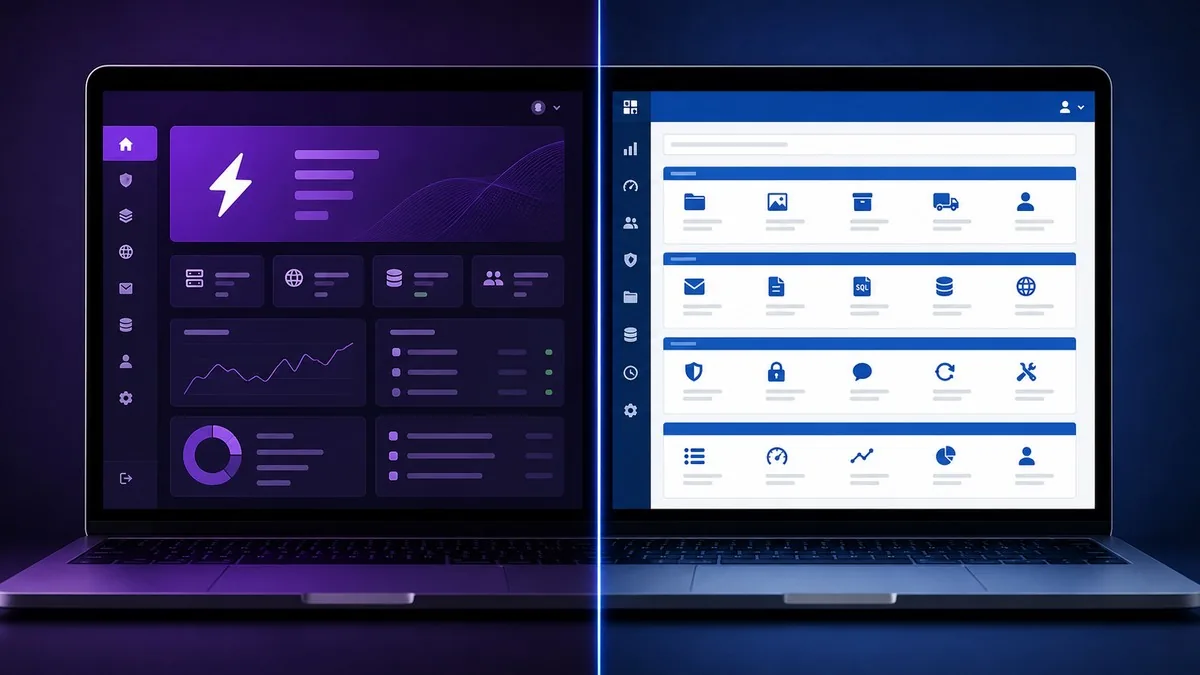
Hostinger’s hPanel is purpose-built for modern site management: WordPress installs, email setup, file management, and domain configuration are cleanly presented with a dashboard-first design. First-time owners find it less overwhelming than cPanel. Bluehost uses cPanel — the 25-year-old industry standard that every developer and freelancer already knows. Bluehost is the right call if you’ve built your workflow around cPanel scripts and SSH familiarity.
WordPress Hosting Comparison
Bluehost’s WordPress integration is tighter out of the box: WordPress.org recommends it directly, and its AI setup wizard can have a styled site ready in minutes. Hostinger counters with its AI Agent for WordPress (included on Business plans), which can manage plugins, optimize performance settings, and generate content from within hPanel. For most WordPress beginners, the experience is effectively equivalent. For pure WordPress performance, see our full Best Web Hosting 2026 guide covering managed hosts like WP Engine and Kinsta.
Security
Both providers include free SSL, DDoS protection, and malware scanning. Hostinger includes unlimited free SSL across all plans including subdomains. Hostinger Business includes daily and on-demand backups in the base price. Bluehost requires a paid CodeGuard add-on ($2–$5/mo) for daily backups — a real extra cost that narrows the price gap.
Customer Support
Hostinger’s live chat averages under 2 minutes response time and supports 8+ languages. There is no phone support. Bluehost offers live chat and phone support 24/7 — the phone line is a genuine differentiator for users who need to verbally walk through complex issues.
Which Should You Choose?
Choose Hostinger if you plan to host more than one website, want daily backups and CDN included without add-ons, are building in India or Southeast Asia, or prefer a cleaner modern control panel.
Choose Bluehost if you’re building exactly one WordPress site and the $1.99/mo Starter price matters, you prefer cPanel and its developer ecosystem, or you need phone support as a fallback option.
Both offer 30-day money-back guarantees, so the risk of trying either is low. For beginners starting from zero in 2026, Hostinger Business is the pick — the gap in storage, site count, and included features is too wide to ignore.
Frequently Asked Questions
Is Hostinger better than Bluehost for WordPress?
For most users, yes. Hostinger’s Business plan includes more storage (50GB NVMe vs. 10GB), more websites (50 vs. 1), daily backups, and a free CDN — all at a comparable or lower price than Bluehost’s equivalent tier. Bluehost has a slight edge in WordPress.org recognition and phone support, but Hostinger’s value proposition wins for multi-site setups.
What happens to your price after the promotional period ends?
Both providers raise prices significantly at renewal. Hostinger Business renews at $16.99/mo (vs. $3.99/mo promo); Bluehost Starter renews at $9.99/mo (vs. $1.99/mo promo). Plan for this from day one — budget for the renewal rate or look for a new promotional term before renewal.
Which host is faster — Hostinger or Bluehost?
Independent 2026 benchmarks generally show Hostinger with faster TTFB (~255–291ms vs. Bluehost’s ~310–463ms). Bluehost’s November 2025 Oracle Cloud migration is improving its speeds. For Indian and Asian users, Hostinger’s Bangalore and Singapore data centers provide a clear latency advantage.
Does Hostinger include daily backups?
Yes — Hostinger Business and Cloud Startup plans include daily and on-demand backups at no extra cost. The entry-level Premium plan includes weekly backups only. Bluehost does not include daily backups in shared hosting plans; you need to add CodeGuard Basic as a paid add-on.
Can I host an Indian website on Hostinger?
Yes. Hostinger has data centers in India (Bangalore) and Singapore that serve South and Southeast Asian users with low latency. You can select your server location during signup. Bluehost’s infrastructure is primarily U.S.-based, resulting in higher latency for Indian visitors — Hostinger is the better choice for India-focused sites.
Hostinger vs Bluehost: Feature-by-Feature Breakdown
Email Hosting
Both providers include email with their hosting plans, but with different limits. Hostinger Business includes 5 mailboxes per website free for the first year, then charges a small fee to continue. The email interface integrates neatly within hPanel. Bluehost’s shared plans include professional email accounts through their own webmail system, with domain-matched addresses (you@yourdomain.com) available on all shared plans. Neither provider is an email-first platform — for serious business email, pairing hosting with Google Workspace or Microsoft 365 is the better call either way.
Free Domain
Both Hostinger and Bluehost include a free domain for the first year on their plans. After the first year, you’ll pay the standard renewal rate — typically $9–$15/year for a .com domain. Hostinger also includes free WHOIS privacy protection (valued at $9.99/year) on all plans, which keeps your personal registration data out of public lookups. Bluehost charges separately for domain privacy.
E-commerce Capabilities
Hostinger Business includes starter WooCommerce support and an AI-powered e-commerce site builder. It also supports Node.js web apps (5 on the Business plan), making it viable for developers building custom storefronts. Bluehost’s eCommerce Essentials plan at $6.99/mo adds dedicated WooCommerce tools, inventory management, and multiple payment integrations. For serious online stores, both companies have purpose-built WooCommerce plans above their shared hosting tiers. Hostinger edges out on included storage and site count even at the e-commerce tier.
Developer Tools
Bluehost’s cPanel gives developers SSH access, Git integration, WP-CLI, and a full suite of PHP configuration options — the same workflow any developer has been using for years. Hostinger’s hPanel supports SSH on all plans, PHP version switching, MySQL database management, and one-click Git deployment. Both are developer-friendly at the intermediate level. Bluehost’s cPanel ecosystem is wider (more third-party scripts and tutorials are written for it), but Hostinger’s panel is faster to navigate for common tasks.
Uptime Guarantees and Real Track Records
Both Hostinger and Bluehost guarantee 99.9% uptime. In practice, independent monitoring tools like UptimeRobot and StatusCake tend to show both providers between 99.90% and 99.98% uptime on shared hosting plans. Neither is meaningfully more reliable than the other at this tier. The 0.1% downtime window translates to roughly 8.7 hours/year — acceptable for blogs and small businesses, but not for anything requiring e-commerce uptime above 99.99%.
Alternatives Worth Considering
If neither Hostinger nor Bluehost fits your exact needs, a few alternatives deserve mention. SiteGround starts at $2.99/mo and is known for excellent WordPress-specific performance and customer support, though it’s pricier at renewal. DreamHost is the third WordPress.org-recommended host, with month-to-month plans that avoid long-term commitment — useful if you’re not ready to lock in 36–48 months. A2 Hosting is a strong choice for developers who need the fastest shared hosting speeds and want a U.S.-based provider with data centers in Michigan. Check our Best Web Hosting 2026 comparison for detailed benchmarks across all of these options.
For those specifically evaluating Hostinger in more depth before committing, our standalone Hostinger Review 2026 covers uptime data, support quality, and hPanel walkthrough in full.


