

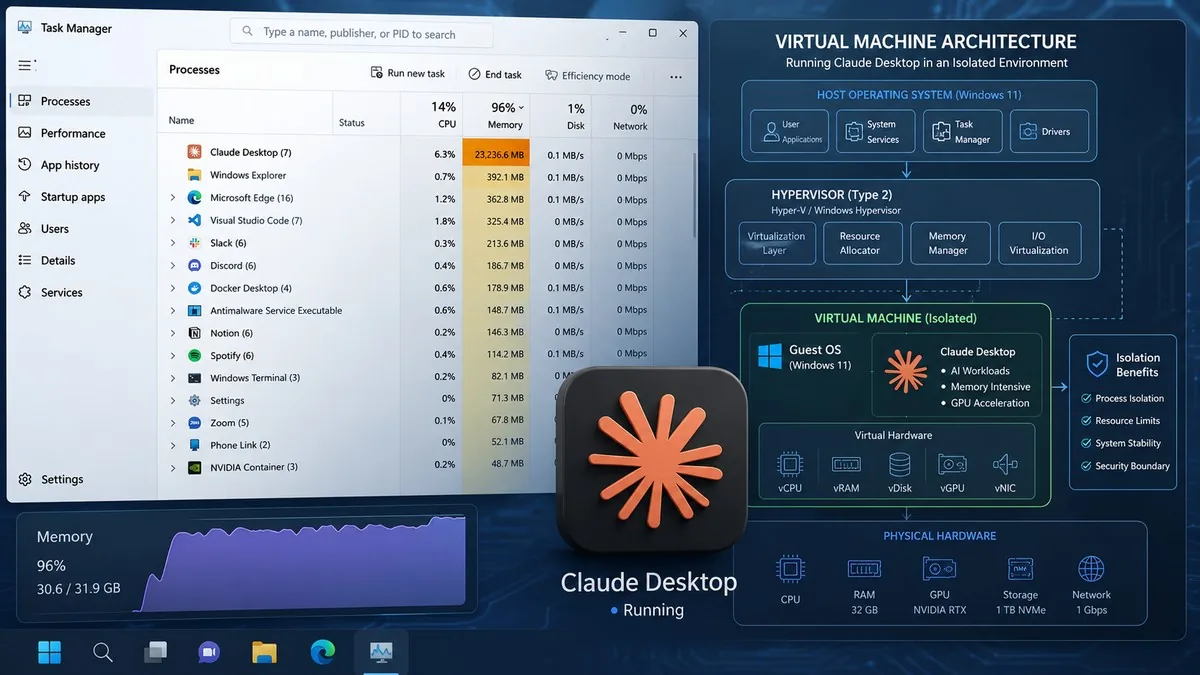
The Claude Desktop Hyper-V VM Windows bug has been quietly draining laptop RAM since February 2026: the app launches a 1.8 GB virtual machine on every startup — even when you only want to send a chat message. GitHub issue #29045 now has over 340 upvotes and 26 comments, and remains open with no fix from Anthropic.
Why the Hyper-V VM Starts on Every Windows Launch
Claude’s Cowork mode uses a sandboxed Linux environment powered by Microsoft’s Hyper-V on Windows. The catch: that virtual machine starts on every launch — not just when you open a Cowork session. The Vmmem process in Task Manager routinely shows 1,796–1,846 MB consumed before you’ve typed a single word. On a 16 GB laptop, that’s over 11% of total system RAM gone to idle infrastructure.
Stale session files accumulating in %APPDATA%\Claude\local-agent-mode-sessions\ make it worse over time. Even after manually deleting those files and killing the vmcompute process, reopening Claude immediately respawns the VM. There is no setting to prevent this.
How Bad Can It Get?
In at least one documented case, Claude Desktop consumed 25 GB of RAM on a 32 GB machine immediately on launch — with over 10 claude.exe processes running before any Cowork tab was ever opened. During active coding sessions, user reports suggest Vmmem can grow to roughly 2.6 GB working set and 4 GB private memory, per GitHub issue #42169.
Developer Jonas Kamsker documented the underlying Hyper-V networking failures in depth at blog.kamsker.at, calling the error messages “misleading” and concluding that non-technical users have “exactly zero chance” of diagnosing the problem on their own.
No Fix and No Opt-Out
As of June 2026, Anthropic has not responded in the GitHub thread, issued a public statement, or released a patch. The only partial workaround is disabling auto-login in Claude Desktop settings, which delays VM startup slightly. Fully disabling Hyper-V through Windows Features eliminates the RAM drain but permanently disables Cowork. Mac users are also affected — several in the same thread report Apple’s Virtualization framework consuming 2.6–3 GB on launch even without using Cowork.
A separate feature request (#57247) asks for a configurable memory cap for the Windows sandbox VM. That issue also remains open and unacknowledged.
Our Take
This kind of friction is exactly what drives users from Claude to ChatGPT — not model benchmarks, but a hidden 1.8 GB VM that starts silently, ships with no off switch, and has gone unacknowledged for four months. Anthropic has built one of the most capable AI assistants available today, but right now its Windows app eats your RAM before you’ve typed a word. That’s a fixable problem — and it should have been fixed months ago.
Frequently Asked Questions
Why does Claude Desktop start a Hyper-V VM on Windows?
Claude’s Cowork mode uses a sandboxed Linux VM powered by Microsoft Hyper-V. It was designed to isolate file management and coding agent operations, but currently launches automatically on every Claude Desktop startup instead of only when Cowork is actually used.
Does this issue only affect Windows users?
No. Multiple Mac users in the same GitHub thread report Apple’s Virtualization framework consuming 2.6–3 GB at launch. However, the Windows Hyper-V implementation is the most widely reported and most visible in Task Manager.
Can I disable the VM without losing Cowork?
Not officially. Disabling auto-login in Claude Desktop settings can delay the VM from starting. Fully disabling Hyper-V through Windows Features removes the RAM drain completely but also permanently disables Cowork on that machine.
Has Anthropic acknowledged or responded to this bug?
Not as of June 2026. GitHub issue #29045 has been open since February with no comment from an Anthropic employee and no fix or timeline announced publicly.
What is the worst-case memory impact?
One user on a 32 GB system reported Claude Desktop consuming 25 GB of RAM immediately on launch, with more than 10 claude.exe processes running before any Cowork session was opened. Typical impact on a 16 GB laptop is roughly 1.8 GB — about 11% of total RAM — consumed at idle.
