Close Menu
WithO2WithO2

    Subscribe to Updates

    Get the latest AI News Tools Updates in your Inbox

    What's Hot

    Shopify Acquires Tailwind Labs — New Paid Sign-Ups Closed as Revenue Fell 80%

    September 11, 2026

    Workflow Automation Software: How to Choose the Right Tool

    September 11, 2026

    Mercury 2.5 Hits 1,107 Tokens/Sec — Claude Haiku-Class AI at $0.04 per Million Tokens

    September 11, 2026

    Subscribe to Updates

    Get the latest creative news from FooBar about art, design and business.

    Facebook X (Twitter) Instagram
    Facebook X (Twitter) Instagram
    WithO2WithO2
    • AI
    • Blog
    • Business Software
    • Trending News
    • Stories
    WithO2WithO2
    Home » Trending News
    Trending News

    n8n AI Assistant Builds Your Workflows From Plain Language — No Code

    By Amitabh SarkarAugust 21, 2026Updated:September 3, 20263 Mins Read8
    Facebook Twitter Pinterest LinkedIn Tumblr Email
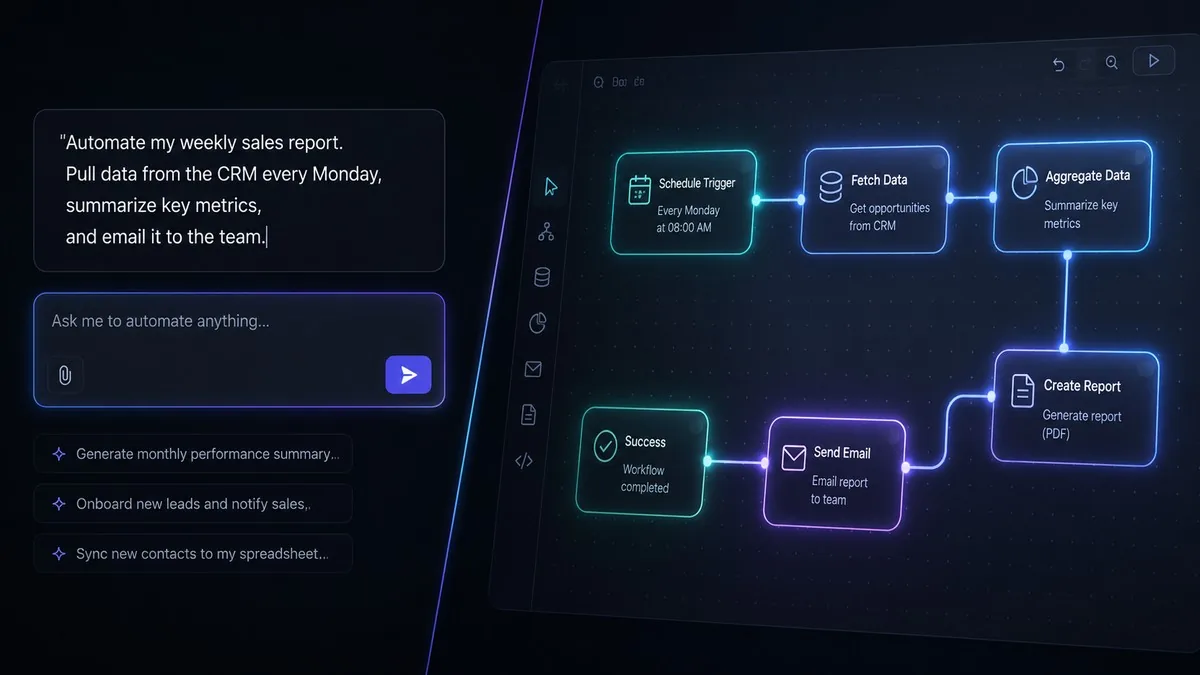
    Chat prompt on the left building a glowing automation node graph on the right in a dark workflow editor
    n8n's AI Assistant turns a plain-language request into a working automation workflow — still in Preview on n8n Cloud.
    Share
    Facebook Twitter LinkedIn Pinterest Email

    n8n launched the AI Assistant on July 9, 2026 — a chat-based agent inside the n8n workflow editor that plans, builds, tests, and debugs automation workflows from plain-language instructions. The AI Assistant runs in Preview on n8n Cloud version 2.29.9 and higher, and remains in Preview as of August 20, 2026.

    n8n is an open-source workflow automation platform that competes with Zapier and Make. The AI Assistant makes n8n the first major open-source workflow automation platform to embed a full workflow-building agent natively in its editor. “Describe what you want to automate, and the AI Assistant can plan the workflow, build it in your selected project, test it, and help you fix errors,” n8n said in its official community announcement, posted by Ophir Prusak on July 9, 2026.

    Table of Contents

    Toggle
    • What the n8n AI Assistant Does
    • Availability, Pricing Model, and Limits
    • Why This Matters for Businesses Choosing Automation Software
    • Our Take
    • For Context

    What the n8n AI Assistant Does

    The n8n AI Assistant performs 3 categories of work from a chat panel: creating workflows from a plain-language description, editing existing workflows, and testing plus troubleshooting — running checks, inspecting errors, and suggesting fixes. The output is a standard n8n workflow that users open, edit, and publish like any hand-built workflow. The Assistant asks for confirmation before high-impact actions, operates within the user’s existing permissions, and never sends credentials or secrets to the AI, according to the announcement.

    The AI Assistant replaces n8n’s earlier AI Workflow Builder. The distinction matters for buyers comparing automation platforms: template-suggestion features recommend pre-built recipes, while the n8n Assistant generates net-new node sequences for the specific automation described.

    Availability, Pricing Model, and Limits

    The AI Assistant is available in Preview on n8n Cloud plans from version 2.29.9; it is not currently available on Enterprise plans. Usage consumes credits based on tokens processed, and users who exhaust Preview credits can upgrade their plan. Self-hosted n8n instances can run the Assistant through early setup instructions n8n published separately — n8n staff described the self-hosted setup as manual and “still complex” as of July 14, 2026.

    n8n states the Assistant “can make mistakes and behavior may change while it’s in development,” and instructs users to review generated workflows before production use. Some capabilities roll out gradually during the Preview.

    Why This Matters for Businesses Choosing Automation Software

    The AI Assistant lowers the skill floor for workflow automation. Building an n8n workflow previously required understanding node configurations and reading documentation; describing the automation in a sentence now produces a working draft. For small and medium businesses automating without a developer, that changes the n8n-versus-Zapier calculus: n8n pairs an open-source, self-hostable model with an agent that does the technical assembly. Zapier and Make offer AI-assisted building, but neither ships a full in-editor agent that plans, builds, tests, and debugs in one loop. Our guide to the best AI agents for business tasks covers how agentic tools such as the n8n Assistant differ from chat-only AI features.

    Our Take

    n8n’s AI Assistant is workflow automation eating its own complexity — the platform now automates the act of building automations. The Preview label and credits model are real constraints: teams should budget for credit consumption and review every generated workflow before production. For SMBs comparing platforms in 2026, the evaluation question shifts from “which tool has the most integrations” to “which tool’s AI can assemble and debug the integration for you.”

    For Context

    • Microsoft Copilot Studio’s AI workflow designer is now live for all — Microsoft’s competing natural-language workflow builder, the closest enterprise parallel to n8n’s Assistant.
    • HubSpot Agent Hub lets teams run AI agents together — witho2.com coverage of the same 2026 shift from AI assistants to executing agents, in CRM software.

    Last Updated: August 2026

    Share. Facebook Twitter Pinterest LinkedIn Tumblr Email
    Amitabh Sarkar
    • Website

    I am a software engineer, I have a passion for working with cutting-edge technologies and staying up-to-date with the latest developments in the field. In my articles, I share my knowledge and insights on a range of topics, including business software, how to set up tools, and the latest trends in the tech industry.

    Related Posts

    Shopify Acquires Tailwind Labs — New Paid Sign-Ups Closed as Revenue Fell 80%

    September 11, 2026

    Mercury 2.5 Hits 1,107 Tokens/Sec — Claude Haiku-Class AI at $0.04 per Million Tokens

    September 11, 2026

    Meta Muse App Launches: Personal AI Agent at $20–$100/Month

    September 11, 2026

    Comments are closed.

    Don't Miss
    Trending News

    Shopify Acquires Tailwind Labs — New Paid Sign-Ups Closed as Revenue Fell 80%

    By Amitabh SarkarSeptember 11, 2026

    Shopify acquired Tailwind Labs, the Canadian company behind the Tailwind CSS framework, on 9 September…

    Workflow Automation Software: How to Choose the Right Tool

    September 11, 2026

    Mercury 2.5 Hits 1,107 Tokens/Sec — Claude Haiku-Class AI at $0.04 per Million Tokens

    September 11, 2026

    Meta Muse App Launches: Personal AI Agent at $20–$100/Month

    September 11, 2026

    Subscribe to Updates

    Get the latest creative news from SmartMag about art & design.

    Stay In Touch
    • Facebook
    • Twitter
    • Pinterest
    • Instagram
    Our Picks

    Workflow Automation Software: How to Choose the Right Tool

    September 11, 2026

    Shopify vs WooCommerce vs BigCommerce 2026: Which Platform Wins?

    August 31, 2026

    12 Best Project Management Software Tools in 2026

    August 1, 2026

    9 Best Ecommerce Platforms Compared (2026)

    July 30, 2026
    Editors Picks

    Shopify Acquires Tailwind Labs — New Paid Sign-Ups Closed as Revenue Fell 80%

    September 11, 2026

    Mercury 2.5 Hits 1,107 Tokens/Sec — Claude Haiku-Class AI at $0.04 per Million Tokens

    September 11, 2026

    Meta Muse App Launches: Personal AI Agent at $20–$100/Month

    September 11, 2026

    OpenAI’s AI Agents Now Do a Researcher’s Job — What It Means

    September 10, 2026
    About Us
    About Us

    Your Source for Innovation: Discover in-depth guides, solutions, and tools tailored to modern business challenges.

    Links
    • Blog
    • Privacy Policy
    • Contact WithO2.com
    • Terms and Conditions
    Facebook X (Twitter) Instagram Pinterest
    • About
    • Editorial Policy
    • Contact
    • Privacy Policy
    • Terms
    © 2026 WITHO2.COM

    Type above and press Enter to search. Press Esc to cancel.