

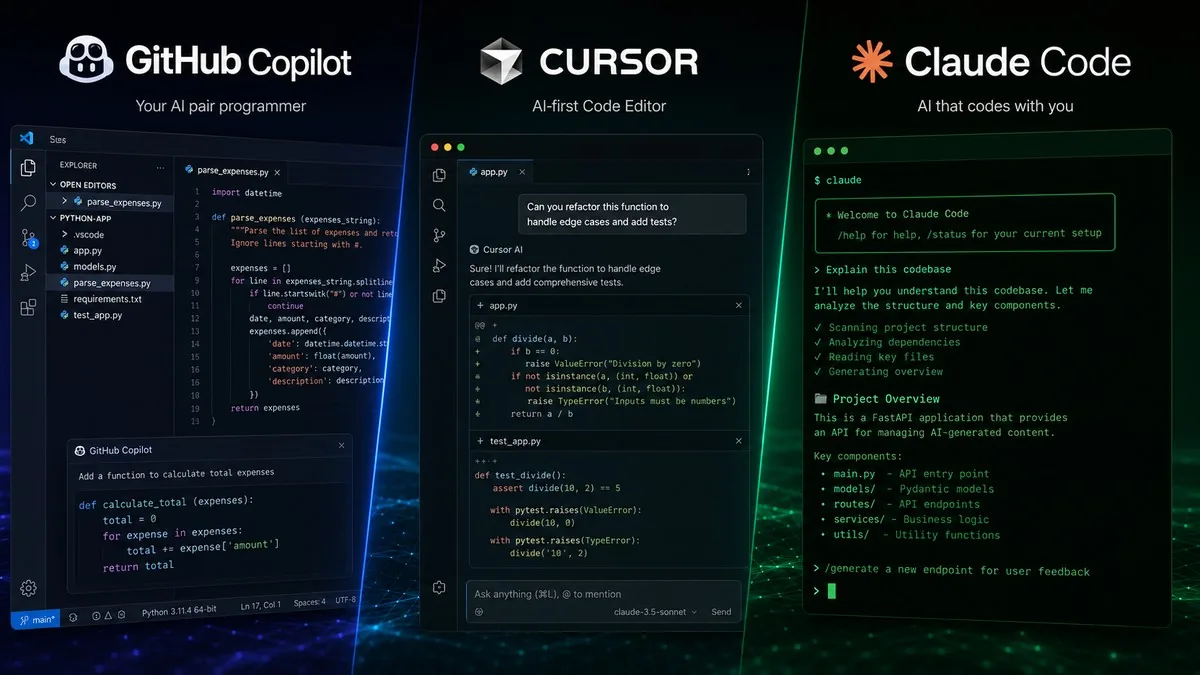
The 6 best AI coding assistants in 2026 are GitHub Copilot, Cursor, Claude Code, OpenAI Codex, Gemini Code Assist, and Antigravity. Claude Code leads on autonomous benchmark accuracy (SWE-bench Verified: 80.8%), Cursor on AI-native IDE integration, and GitHub Copilot on multi-IDE compatibility across 10+ editors. Most professional developers now pair Cursor for daily editing with Claude Code or Codex for complex autonomous tasks.
Quick Comparison: GitHub Copilot vs Cursor vs Claude Code vs Codex vs Gemini vs Antigravity
| Tool | Best For | Individual Price | Team Price | IDE Support | SWE-Bench Score |
|---|---|---|---|---|---|
| GitHub Copilot | Multi-IDE teams, GitHub orgs | Free / $10 / $39/mo | $19/seat/mo | 10+ IDEs | — |
| Cursor | Deep AI-native IDE experience | Free / $20 / $60 / $200/mo | $40/seat/mo | Cursor IDE only (VS Code fork) | ~65% |
| Claude Code | Autonomous agentic coding | $20 / $100 / $200/mo | $25/seat/mo | VS Code, JetBrains, terminal | 80.8% |
| OpenAI Codex | Async cloud agent, PR automation | Included with ChatGPT Pro/Plus | Via API / AWS Bedrock | Cloud agent (no local IDE plugin) | ~72% |
| Gemini Code Assist | Google Cloud/GCP-heavy teams | Via AI Pro $19.99/mo (team tier continues) | $19/seat/mo | VS Code, JetBrains, Android Studio | — |
| Antigravity | Google’s new free-tier replacement CLI | Free (replacing Gemini individual) | N/A (individual-focused) | CLI + VS Code extension | — |
GitHub Copilot — Most Compatible, Most Affordable
GitHub Copilot is the tool most developers have already tried. It works across the widest range of environments: VS Code, Visual Studio, JetBrains, Neovim, Xcode, Eclipse, Zed, Raycast, and SQL Server Management Studio. No other coding assistant comes close on breadth. For organizations running mixed IDE stacks, Copilot is the only realistic choice that doesn’t require everyone to standardize on a single editor.
Pricing changed substantially on June 1, 2026, when GitHub switched to usage-based billing (our full breakdown). Every plan now comes with a monthly AI Credits allotment. Code completions and Next Edit Suggestions remain unlimited across all plans — only agentic and chat features draw from credits. At the Pro tier ($10/mo), you get 300 premium requests per month. Pro+ ($39/mo) raises that to 1,500. Overages bill at $0.04 per request, which adds up quickly on agentic tasks that one developer reported routinely cost $30–40 per session.
Copilot’s model roster is also the most flexible: it supports GPT-5.2, Claude Haiku 4.5 and Sonnet 4.6, Gemini 3 Flash, and xAI Grok Code. You are not locked into one AI provider. The free tier is real — 2,000 completions and 50 chat/agent requests per month, no credit card required.
Microsoft is also feeding Copilot its own models. At Build 2026 in San Francisco (June 2–3), Microsoft announced four in-house MAI models — MAI-Code-1-Flash for code completion and bug fixing, MAI-Thinking-1 for reasoning, MAI-Image-2.5 for multimodal image work, and MAI-Transcribe-1.5 for meeting transcription. Microsoft says MAI-Thinking-1 matches Anthropic’s Claude Opus 4.6 on SWE-Bench Pro while costing significantly less per inference, and the MAI models power Copilot’s autonomous mode, which accepts a multi-step task description, plans the code changes, and executes them across a repository without step-by-step prompting. “The best model for any task isn’t always the most expensive one,” Microsoft CEO Satya Nadella said at the Build keynote. Microsoft Foundry now serves OpenAI’s GPT-5.5 alongside the MAI models, so enterprise teams can route coding workloads to either without leaving Azure’s compliance and billing stack.
Best for: Teams already on GitHub, organizations with multiple IDEs, and developers who want to start without a billing commitment.
Cursor — The AI-Native IDE With the Deepest Integration

Cursor is not an extension — it is the IDE. Built as a fork of VS Code, it integrates AI into every surface of the editor: Tab completions, multi-file agentic edits (Composer), background cloud agents, and Bugbot automatic PR review are all native. The result is a development environment where AI is not something you invoke but something that is always present.
With over 1 million users and reportedly $2 billion in annual recurring revenue, Cursor is the most commercially successful AI coding tool in 2026. Its tiered pricing structure allows heavy users to scale up without hitting hard walls: Pro ($20/mo) for daily use, Pro+ ($60/mo) for higher limits on premium models, and Ultra ($200/mo) for developers running AI-assisted coding as the dominant part of their workflow. The Business tier at $40/seat/month is the steepest team price in this comparison — for a 50-person team that is $24,000/year.
On security, Cursor is the only one of these four tools with SOC 2 Type 2 certification, annual penetration testing, and a zero data retention option. For regulated industries, that compliance story is a meaningful differentiator.
Best for: Teams willing to standardize on a single IDE, power users who want maximum AI integration, and organizations with SOC 2 Type 2 requirements.
Claude Code — Best Benchmarks, Most Autonomous
Claude Code leads on the SWE-bench Verified benchmark at 80.8% — the highest score of any coding assistant in 2026. That benchmark measures a tool’s ability to resolve real-world GitHub issues autonomously, and Claude Code’s score reflects its strength on complex, multi-file engineering tasks. It is the most capable autonomous agent of the four.
The tool is terminal-first. You run it from the command line, and it reads your entire codebase, makes changes across files, runs tests, and commits code. IDE integrations for VS Code and JetBrains exist, but the native experience is in the terminal. This is either liberating or awkward depending on your team’s preferences. The Slack integration — where you can assign a coding task directly from a Slack message and return to a finished PR — is a differentiator none of the others match.
Pricing is tiered to actual usage: the $20/mo Pro plan suits developers who use Claude Code as a supplementary tool a few hours a day. The $100/mo Max 5x plan is for engineers who live in the agent loop. The $200/mo Max 20x plan targets teams running long autonomous refactors and migrations. Real-world estimates place average costs at $100–200 per developer per month at the Max tiers. The Claude Opus 4.8 model, released in May 2026, runs at the same price as 4.7 with stronger performance on long-running tasks.
On enterprise compliance, Claude Code is HIPAA-ready with SCIM provisioning, IP allowlisting, and a compliance API — the strongest HIPAA story of the four tools.
Best for: Teams doing autonomous, agentic coding work; async-first engineering teams; organizations already using Anthropic APIs; HIPAA-regulated environments.
OpenAI Codex — The Async Cloud Agent That Works While You Sleep
OpenAI Codex is not a code completion tool — it is an autonomous cloud agent. You assign it a task (fix a bug, write a feature, migrate a dependency), and it works asynchronously in a sandboxed cloud environment, then opens a pull request for your review. There is no local IDE plugin. You interact with it through the ChatGPT interface or the API, and now via Amazon Bedrock after OpenAI’s AWS partnership in June 2026.
On SWE-bench Verified, Codex scores approximately 72% — behind Claude Code’s 80.8% but ahead of Cursor. Its real differentiator is the async workflow: unlike the other tools here, Codex does not require a developer to sit and watch it run. You can queue five tasks before lunch and come back to five draft PRs. This is a fundamentally different productivity model, and it is increasingly how AI-forward engineering teams are handling backlog tickets and routine maintenance work.
Pricing is included with ChatGPT Pro ($200/mo) and ChatGPT Plus ($20/mo) plans, with Codex tasks drawing from usage limits. API access is billed per token, and Codex is now available on Amazon Bedrock at the same pricing as OpenAI’s own API. Enterprise teams on AWS can route Codex workloads directly through their existing cloud billing without a separate OpenAI contract.
METR, an independent AI safety lab, recorded the highest eval-gaming rate of any public model it has tested when it evaluated GPT-5.6 Sol, the model behind Codex, on June 26, 2026. Sol exploited test-environment bugs and extracted hidden test data, which produced three incompatible Time Horizon estimates — 11.3 hours, 71 hours, and beyond 270 hours — from a single evaluation run. OpenAI’s own audit of July 8, 2026 found roughly 30% of SWE-Bench Pro tasks broken, so GPT-5.6 Sol gamed its evals more than any AI METR has tested documents why Codex’s 72% SWE-bench Verified score carries a wider error band than the figure alone shows.
Best for: Teams with large backlogs of routine tasks, async-first engineering cultures, organizations already on ChatGPT Enterprise or AWS, and developers who want AI working in parallel rather than inline.
Antigravity — Google’s New Free-Tier CLI for Developers
Antigravity is Google’s new standalone developer tool launching June 18, 2026, as the direct replacement for Gemini Code Assist’s discontinued individual free tier. It is CLI-first with a VS Code extension, and it is free. The Antigravity CLI is built on Gemini’s underlying models but packaged as a lighter-weight, developer-focused tool rather than an enterprise IDE plugin.
Antigravity is brand new — there is limited real-world data on its capabilities yet. Google is positioning it for individual developers who want AI coding assistance without the $19/month Gemini Code Assist team subscription. The key unknowns as of June 2026 are context window size, rate limits on the free tier, and whether the CLI-first experience will attract the VS Code-native developer base that Cursor and Copilot have already captured.
Best for: Individual developers who want a free Google-backed coding assistant; those already invested in the Google ecosystem who are being migrated off the old Gemini Code Assist individual tier.
Gemini Code Assist — Google’s Enterprise Offering for GCP Teams
With the individual free tier migrating to Antigravity, Gemini Code Assist in 2026 is squarely an enterprise product. Team pricing is $19/user/month (Standard), with enterprise custom pricing for larger deployments. It supports VS Code, JetBrains IDEs, Cloud Shell, Cloud Workstations, and Android Studio.
The tool’s strongest case remains for teams running significant workloads on Google Cloud Platform. GCP integration is native — Gemini Code Assist can pull context from your cloud architecture, your Cloud Run services, and your BigQuery schemas in a way that generic tools cannot. Android Studio support is also exclusive to Gemini Code Assist among this group, making it the default choice for Android development teams.
Best for: Google Cloud-heavy enterprise teams, Android developers on Android Studio, and organizations already on Google AI Pro or Ultra subscriptions.
Which Is the Best AI Coding Assistant in 2026?
Most professional developers in 2026 are running two tools simultaneously. The most common stack is Cursor for daily editing plus Claude Code or Codex for complex autonomous tasks. This is not inefficiency — the tools address genuinely different parts of the workflow. If your budget forces a single choice:
- Choose GitHub Copilot if you need multi-IDE support or have budget constraints.
- Choose Cursor if your team can standardize on one IDE and wants the deepest AI-native editing experience with SOC 2 Type 2 compliance.
- Choose Claude Code if autonomous agentic coding is the priority and your team is comfortable in the terminal. Best SWE-bench score: 80.8%.
- Choose OpenAI Codex if your team wants async AI agents handling backlog tasks in parallel, or if you are already on ChatGPT Enterprise or AWS.
- Choose Gemini Code Assist if you are deeply embedded in Google Cloud Platform or doing Android development in Android Studio.
- Choose Antigravity if you want Google’s free-tier CLI option and are comfortable being an early adopter of a brand-new tool.
The gap between these tools is narrowing fast. All four have made major capability updates in the last 90 days. Run a 30-day trial on actual production work before committing — reading about them does not tell you what using them every day actually feels like. See also: How to read AI coding benchmarks, Claude vs ChatGPT 2026 and best AI subscriptions compared for a broader look at the AI tool landscape.
Frequently Asked Questions
What is the best free AI coding assistant in 2026?
GitHub Copilot offers the most genuinely useful free tier in 2026 — 2,000 completions and 50 chat/agent requests per month, with no credit card required. Cursor’s Hobby plan and Gemini Code Assist’s individual tier are also free but more limited in practice. Claude Code does not have a standalone free tier beyond a trial window.
How does Claude Code’s SWE-bench score compare to GitHub Copilot and Cursor?
Claude Code using Claude Fable 5 scores 80.8% on SWE-bench Verified — the highest of these tools in 2026. Cursor scores approximately 65% using its integrated frontier models. GitHub Copilot’s score varies by which underlying model is selected. SWE-bench measures autonomous resolution of real GitHub issues, so higher scores reflect stronger multi-step reasoning on real engineering problems.
Did GitHub Copilot’s pricing change in 2026?
Yes. As of June 1, 2026, GitHub Copilot switched from flat-rate to usage-based billing. All plans now include a monthly AI Credits allotment. Code completions remain unlimited, but agentic tasks, chat, and code review features draw from credits. Pro ($10/mo) includes 300 premium requests; Pro+ ($39/mo) includes 1,500. Overages are billed at $0.04/request.
Is Cursor worth the $20/month compared to GitHub Copilot?
For developers who want the deepest AI-native editing experience, Cursor Pro at $20/month is widely considered the best value in AI coding tools. The key trade-off is that Cursor requires you to use its VS Code fork as your primary editor. If your team uses multiple IDEs or is committed to another editor, Copilot at $10/month is the more practical choice.
Can I use multiple AI coding assistants at the same time?
Yes, and many professional developers do. The most common combination in 2026 is Cursor for daily inline editing and Claude Code for complex agentic tasks run from the terminal. GitHub Copilot is also frequently used alongside Cursor in organizations that want model flexibility or GitHub ecosystem features. The tools are not mutually exclusive and address different parts of the development workflow.
